
選中樣式工具列
當用戶在圖表上選中標注時,選中項附近會出現一個浮動工具列。本頁介紹如何使用與標注屬性對話框相同的 AnnotationManagement trait 方法構建該工具列。
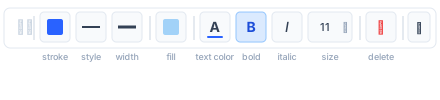
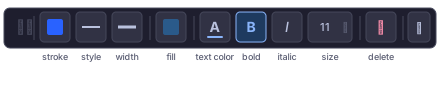
概述
工具列是一個水平條,提供對選中標注最常用視覺屬性的快速訪問控件。與覆蓋所有描述符的完整屬性對話框不同,工具列按視覺角色對描述符分組——描邊顏色、線型、線寬、填充顏色、文字樣式——即使有多個描述符適用(如具有 7 條水平線的 ParallelChannel),每組也只渲染一個共享控件。
觸發工具列
監聽 ChartEvent::SelectionChanged:
rust
ChartEvent::SelectionChanged(Some(ChartElement::Annotation(id))) => {
    let descriptors = cv.annotation_properties(id).unwrap_or_default();
    let values = load_values(&cv, id, &descriptors);
    show_toolbar(id, &descriptors, &values, cv.selected_annotation_bounds());
}
ChartEvent::SelectionChanged(None) => {
    hide_toolbar();
}
使用 cv.selected_annotation_bounds() 定位工具列,該方法返回畫布像素坐標中的邊界框 Option<Rect>。
分組描述符
按每個描述符所貢獻的視覺角色對描述符列表分組。單個 Stroke 描述符(三個標誌全部設置)會同時貢獻到三個描邊槽位。
rust
#[derive(Default)]
struct ToolbarGroups<'a> {
    stroke_colors: Vec<&'a PropertyDescriptor>,
    line_widths:   Vec<&'a PropertyDescriptor>,
    line_styles:   Vec<&'a PropertyDescriptor>,
    fill_colors:   Vec<&'a PropertyDescriptor>,
    text_styles:   Vec<&'a PropertyDescriptor>,
}

fn group_descriptors<'a>(descriptors: &'a [PropertyDescriptor]) -> ToolbarGroups<'a> {
    let mut g = ToolbarGroups::default();
    for d in descriptors {
        match &d.kind {
            // 填充顏色
            PropertyKind::Fill => g.fill_colors.push(d),

            // 描邊——標誌控制該描述符貢獻到哪些槽位
            PropertyKind::Stroke { flags } => {
                if flags.contains(StrokeFlags::COLOR) { g.stroke_colors.push(d); }
                if flags.contains(StrokeFlags::WIDTH) { g.line_widths.push(d); }
                if flags.contains(StrokeFlags::STYLE) { g.line_styles.push(d); }
            }

            // 文字樣式——始終貢獻到文字樣式槽位
            PropertyKind::TextStyle { .. } => g.text_styles.push(d),

            // Group(如 ParallelChannel 水平線、Pitchfork 層級)
            // ——為工具列目的視為多個描邊描述符
            PropertyKind::Group { items, .. } => {
                // 使用 group 描述符本身作為代理;工具列
                // 通過 GroupItems 寫入所有條目。
                // 檢查第一個條目的 kind 以確定適用哪些槽位。
                if let Some(first) = items.first() {
                    if let PropertyKind::Stroke { flags } = &first.kind {
                        if flags.contains(StrokeFlags::COLOR) { g.stroke_colors.push(d); }
                        if flags.contains(StrokeFlags::WIDTH) { g.line_widths.push(d); }
                        if flags.contains(StrokeFlags::STYLE) { g.line_styles.push(d); }
                    }
                }
            }

            _ => {}
        }
    }
    g
}
僅當對應分組非空時才顯示工具列槽位。
讀取描邊子字段
從任意描述符中提取相關子字段用於顯示:
rust
enum StrokeField { Color, Width, Style }

fn read_stroke_field(
    d: &PropertyDescriptor,
    values: &HashMap<String, PropertyValueResult>,
    field: StrokeField,
) -> Option<PropertyValue> {
    let pv = match values.get(&d.name)? {
        PropertyValueResult::Value(v) => v,
        _ => return None,
    };

    // 如果存在 Enableable 包裝,則解包
    let inner = match pv {
        PropertyValue::Enableable(e) => e.value.as_ref(),
        other => other,
    };

    // 對於 Group,檢查條目 0
    let stroke = match inner {
        PropertyValue::Stroke(s) => s,
        PropertyValue::GroupItems(items) => {
            let item_value = match items.first()?.value.as_ref() {
                PropertyValue::Stroke(s) => s,
                _ => return None,
            };
            item_value
        }
        _ => return None,
    };

    Some(match field {
        StrokeField::Color => PropertyValue::Color(stroke.color),
        StrokeField::Width => PropertyValue::Float(stroke.width),
        StrokeField::Style => PropertyValue::LineStyle(stroke.style),
    })
}
當多個描述符共享同一槽位時(如 DisjointChannel 的兩條描邊),使用第一個返回具體值的描述符。
寫入描邊子字段
修改捆綁包值,只寫入變化的字段:
rust
fn write_stroke_field(
    cv: &impl AnnotationManagement,
    id: AnnotationId,
    d: &PropertyDescriptor,
    values: &HashMap<String, PropertyValueResult>,
    field: StrokeField,
    new_val: PropertyValue,
) -> Result<(), ChartPropertyError> {
    let default_stroke = Stroke { color: Color::from_rgba(0, 0, 0, 255), width: 1.0, style: LineStyle::Solid };

    match &d.kind {
        PropertyKind::Stroke { .. } => {
            let (enabled, mut stroke) = read_stroke_with_enabled(values, d, &default_stroke);
            apply_stroke_field(&mut stroke, field, new_val);
            let value = if d.enableable {
                PropertyValue::Enableable(EnableableValue {
                    enabled,
                    value: Box::new(PropertyValue::Stroke(stroke)),
                })
            } else {
                PropertyValue::Stroke(stroke)
            };
            cv.set_annotation_property(id, &d.name, value)
        }

        PropertyKind::Group { .. } => {
            // 將更改應用到 group 中的每個條目
            let items = match values.get(&d.name) {
                Some(PropertyValueResult::Value(PropertyValue::GroupItems(v))) => v.clone(),
                _ => return Ok(()),
            };
            let items: Vec<GroupItemValue> = items
                .into_iter()
                .map(|mut item| {
                    if let PropertyValue::Stroke(ref mut s) = *item.value {
                        apply_stroke_field(s, field, new_val.clone());
                    }
                    item
                })
                .collect();
            cv.set_annotation_property(id, &d.name, PropertyValue::GroupItems(items))
        }

        _ => Ok(()),
    }
}

fn apply_stroke_field(s: &mut Stroke, field: StrokeField, val: PropertyValue) {
    match (field, val) {
        (StrokeField::Color, PropertyValue::Color(c))     => s.color = c,
        (StrokeField::Width, PropertyValue::Float(w))     => s.width = w,
        (StrokeField::Style, PropertyValue::LineStyle(ls)) => s.style = ls,
        _ => {}
    }
}
對於多描述符槽位(如 FlatTopBottom 含 top 和 bottom 兩條描邊), 將寫入應用到分組中的所有描述符:
rust
fn apply_to_group(
    cv: &impl AnnotationManagement,
    id: AnnotationId,
    group: &[&PropertyDescriptor],
    values: &HashMap<String, PropertyValueResult>,
    field: StrokeField,
    new_val: PropertyValue,
) {
    for d in group {
        let _ = write_stroke_field(cv, id, d, values, field, new_val.clone());
    }
}
工具列控件
| 槽位 | 顯示條件 | 控件 | 寫入方式 |
|---|---|---|---|
| 描邊顏色 | stroke_colors 非空 | 顏色色塊 → 選擇器 | StrokeField::Color 應用到分組所有描述符 |
| 線型 | line_styles 非空 | 3 按鈕切換:實線 / 虛線 / 點線 | StrokeField::Style 應用到分組所有描述符 |
| 線寬 | line_widths 非空 | 按鈕組(1 / 2 / 3 / 4 px) | StrokeField::Width 應用到分組所有描述符 |
| 填充顏色 | fill_colors 非空 | 顏色色塊 → 選擇器 | PropertyValue::Color |
| 文字顏色 | text_styles 非空 | 顏色色塊 → 選擇器 | 修改 TextStyle.color |
| 粗體 | text_styles 非空 | 切換 B | 修改 TextStyle.bold |
| 斜體 | text_styles 非空 | 切換 I | 修改 TextStyle.italic |
| 字號 | text_styles 非空 | 下拉框(8 / 10 / 12 / 14 / 16 / 20 / 24) | 修改 TextStyle.font_size |
| 刪除 | 始終顯示 | 垃圾桶圖示 | cv.delete_selected_annotation() |
| 更多(⋯) | 可選 | 打開完整屬性對話框 | — |
讀取文字樣式子字段
rust
fn read_text_style_field(
    d: &PropertyDescriptor,
    values: &HashMap<String, PropertyValueResult>,
) -> Option<TextStyle> {
    match values.get(&d.name)? {
        PropertyValueResult::Value(PropertyValue::TextStyle(ts)) => Some(ts.clone()),
        PropertyValueResult::Value(PropertyValue::Enableable(e)) => {
            match e.value.as_ref() {
                PropertyValue::TextStyle(ts) => Some(ts.clone()),
                _ => None,
            }
        }
        _ => None,
    }
}
刷新工具列
在每次 AnnotationUpdated 事件時重新讀取描述符值,以與屬性對話框的更改保持同步:
rust
ChartEvent::AnnotationUpdated(id) if id == selected_id => {
    values = load_values(&cv, id, &descriptors);
    refresh_toolbar(&values);
}
ChartEvent::SelectionChanged(_) => {
    // 每次選擇變更時重新運行完整的 show_toolbar 邏輯
}
參考實現
參見 Web Playground 中的 SelectionToolbar.vue,了解完整的前端實現。