
Selection Style Toolbar
When the user selects an annotation on the chart, a floating toolbar appears near the selection. This page covers how to build that toolbar using the same AnnotationManagement trait methods as the Annotation Properties Dialog.
Overview
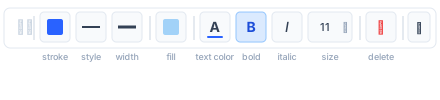
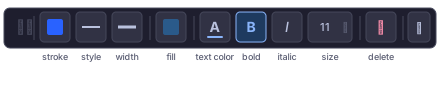
The toolbar is a horizontal strip of quick-access controls for the most common visual properties of the selected annotation. Unlike the full properties dialog, the toolbar groups descriptors by visual role — stroke colour, line style, line width, fill colour, text style — and renders a single shared control per group even when multiple descriptors apply (e.g. a ParallelChannel with 7 level lines).
Triggering the Toolbar
Listen for ChartEvent::SelectionChanged:
ChartEvent::SelectionChanged(Some(ChartElement::Annotation(id))) => {
    let descriptors = cv.annotation_properties(id).unwrap_or_default();
    let values = load_values(&cv, id, &descriptors);
    show_toolbar(id, &descriptors, &values, cv.selected_annotation_bounds());
}
ChartEvent::SelectionChanged(None) => {
    hide_toolbar();
}
Position the toolbar using cv.selected_annotation_bounds(), which returns the bounding box Option<Rect> in canvas pixels.
Grouping Descriptors
Group the descriptor list by the visual role each descriptor contributes to. A single Stroke descriptor (all three flags set) contributes to all three stroke slots.
#[derive(Default)]
struct ToolbarGroups<'a> {
    stroke_colors: Vec<&'a PropertyDescriptor>,
    line_widths:   Vec<&'a PropertyDescriptor>,
    line_styles:   Vec<&'a PropertyDescriptor>,
    fill_colors:   Vec<&'a PropertyDescriptor>,
    text_styles:   Vec<&'a PropertyDescriptor>,
}

fn group_descriptors<'a>(descriptors: &'a [PropertyDescriptor]) -> ToolbarGroups<'a> {
    let mut g = ToolbarGroups::default();
    for d in descriptors {
        match &d.kind {
            // Fill colour
            PropertyKind::Fill => g.fill_colors.push(d),

            // Stroke — flags control which slots this descriptor contributes to
            PropertyKind::Stroke { flags } => {
                if flags.contains(StrokeFlags::COLOR) { g.stroke_colors.push(d); }
                if flags.contains(StrokeFlags::WIDTH) { g.line_widths.push(d); }
                if flags.contains(StrokeFlags::STYLE) { g.line_styles.push(d); }
            }

            // Text style — always contributes to the text-style slot
            PropertyKind::TextStyle { .. } => g.text_styles.push(d),

            // Group (e.g. ParallelChannel levels, Pitchfork levels)
            // — treat as multiple stroke descriptors for toolbar purposes
            PropertyKind::Group { items, .. } => {
                // Use the group descriptor itself as a proxy; the toolbar
                // writes to all items via GroupItems.
                // Check the first item's kind to determine which slots apply.
                if let Some(first) = items.first() {
                    if let PropertyKind::Stroke { flags } = &first.kind {
                        if flags.contains(StrokeFlags::COLOR) { g.stroke_colors.push(d); }
                        if flags.contains(StrokeFlags::WIDTH) { g.line_widths.push(d); }
                        if flags.contains(StrokeFlags::STYLE) { g.line_styles.push(d); }
                    }
                }
            }

            _ => {}
        }
    }
    g
}
Show a toolbar slot only when the corresponding group is non-empty.
Reading Stroke Sub-Fields
Extract the relevant sub-field from any descriptor for display:
enum StrokeField { Color, Width, Style }

fn read_stroke_field(
    d: &PropertyDescriptor,
    values: &HashMap<String, PropertyValueResult>,
    field: StrokeField,
) -> Option<PropertyValue> {
    let pv = match values.get(&d.name)? {
        PropertyValueResult::Value(v) => v,
        _ => return None,
    };

    // Unwrap Enableable wrapper if present
    let inner = match pv {
        PropertyValue::Enableable(e) => e.value.as_ref(),
        other => other,
    };

    // For Group, inspect item 0
    let stroke = match inner {
        PropertyValue::Stroke(s) => s,
        PropertyValue::GroupItems(items) => {
            let item_value = match items.first()?.value.as_ref() {
                PropertyValue::Stroke(s) => s,
                _ => return None,
            };
            item_value
        }
        _ => return None,
    };

    Some(match field {
        StrokeField::Color => PropertyValue::Color(stroke.color),
        StrokeField::Width => PropertyValue::Float(stroke.width),
        StrokeField::Style => PropertyValue::LineStyle(stroke.style),
    })
}
When multiple descriptors share a slot (e.g. the two strokes of a DisjointChannel), use the first one that returns a concrete value.
Writing Stroke Sub-Fields
Patch the bundle value, writing only the changed field:
fn write_stroke_field(
    cv: &impl AnnotationManagement,
    id: AnnotationId,
    d: &PropertyDescriptor,
    values: &HashMap<String, PropertyValueResult>,
    field: StrokeField,
    new_val: PropertyValue,
) -> Result<(), ChartPropertyError> {
    let default_stroke = Stroke { color: Color::from_rgba(0, 0, 0, 255), width: 1.0, style: LineStyle::Solid };

    match &d.kind {
        PropertyKind::Stroke { .. } => {
            let (enabled, mut stroke) = read_stroke_with_enabled(values, d, &default_stroke);
            apply_stroke_field(&mut stroke, field, new_val);
            let value = if d.enableable {
                PropertyValue::Enableable(EnableableValue {
                    enabled,
                    value: Box::new(PropertyValue::Stroke(stroke)),
                })
            } else {
                PropertyValue::Stroke(stroke)
            };
            cv.set_annotation_property(id, &d.name, value)
        }

        PropertyKind::Group { .. } => {
            // Apply the change to every item in the group
            let items = match values.get(&d.name) {
                Some(PropertyValueResult::Value(PropertyValue::GroupItems(v))) => v.clone(),
                _ => return Ok(()),
            };
            let items: Vec<GroupItemValue> = items
                .into_iter()
                .map(|mut item| {
                    if let PropertyValue::Stroke(ref mut s) = *item.value {
                        apply_stroke_field(s, field, new_val.clone());
                    }
                    item
                })
                .collect();
            cv.set_annotation_property(id, &d.name, PropertyValue::GroupItems(items))
        }

        _ => Ok(()),
    }
}

fn apply_stroke_field(s: &mut Stroke, field: StrokeField, val: PropertyValue) {
    match (field, val) {
        (StrokeField::Color, PropertyValue::Color(c))     => s.color = c,
        (StrokeField::Width, PropertyValue::Float(w))     => s.width = w,
        (StrokeField::Style, PropertyValue::LineStyle(ls)) => s.style = ls,
        _ => {}
    }
}
For multi-descriptor slots (e.g. FlatTopBottom with top and bottom strokes), apply the write to all descriptors in the group:
fn apply_to_group(
    cv: &impl AnnotationManagement,
    id: AnnotationId,
    group: &[&PropertyDescriptor],
    values: &HashMap<String, PropertyValueResult>,
    field: StrokeField,
    new_val: PropertyValue,
) {
    for d in group {
        let _ = write_stroke_field(cv, id, d, values, field, new_val.clone());
    }
}
Toolbar Controls
| Slot | When to show | Widget | Write via |
|---|---|---|---|
| Stroke colour | stroke_colors non-empty | Colour swatch → picker | StrokeField::Color for all in group |
| Line style | line_styles non-empty | 3-button toggle: solid / dashed / dotted | StrokeField::Style for all in group |
| Line width | line_widths non-empty | Button group (1 / 2 / 3 / 4 px) | StrokeField::Width for all in group |
| Fill colour | fill_colors non-empty | Colour swatch → picker | PropertyValue::Color |
| Text colour | text_styles non-empty | Colour swatch → picker | Patch TextStyle.color |
| Bold | text_styles non-empty | Toggle B | Patch TextStyle.bold |
| Italic | text_styles non-empty | Toggle I | Patch TextStyle.italic |
| Font size | text_styles non-empty | Dropdown (8 / 10 / 12 / 14 / 16 / 20 / 24) | Patch TextStyle.font_size |
| Delete | Always | Trash icon | cv.delete_selected_annotation() |
| More (⋯) | Optional | Opens full properties dialog | — |
Reading Text Style Sub-Fields
fn read_text_style_field(
    d: &PropertyDescriptor,
    values: &HashMap<String, PropertyValueResult>,
) -> Option<TextStyle> {
    match values.get(&d.name)? {
        PropertyValueResult::Value(PropertyValue::TextStyle(ts)) => Some(ts.clone()),
        PropertyValueResult::Value(PropertyValue::Enableable(e)) => {
            match e.value.as_ref() {
                PropertyValue::TextStyle(ts) => Some(ts.clone()),
                _ => None,
            }
        }
        _ => None,
    }
}
Refreshing the Toolbar
Re-read descriptor values on each AnnotationUpdated event to keep the toolbar in sync with changes made via the properties dialog:
ChartEvent::AnnotationUpdated(id) if id == selected_id => {
    values = load_values(&cv, id, &descriptors);
    refresh_toolbar(&values);
}
ChartEvent::SelectionChanged(_) => {
    // Re-run the full show_toolbar logic on every selection change
}
Reference Implementation
See SelectionToolbar.vue in the web playground for a complete frontend implementation.